Web-based ERP for Saudi companies

Finance, sales, HR and operations in one bilingual ERP

Sila ERP runs accounting, treasury, sales with ZATCA e-invoicing, purchasing, warehouses, HR, payroll, fixed assets, budgets and projects in one system – with a check-and-approve step before anything is posted.

  • Arabic & English, full RTL
  • Built for ZATCA Phase 2
  • Built-in chat, sessions, Gantt & archiving
  • Light & dark mode
  • Desktop, tablet and phone
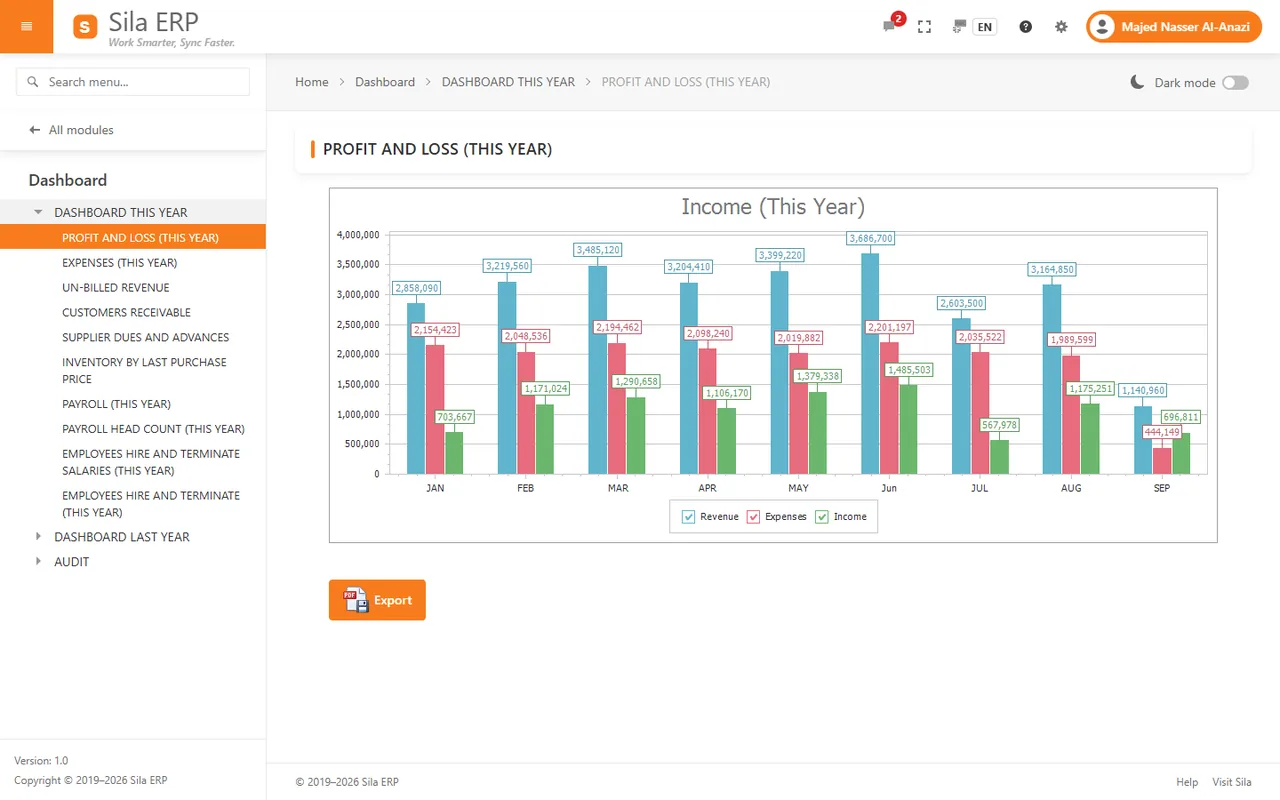
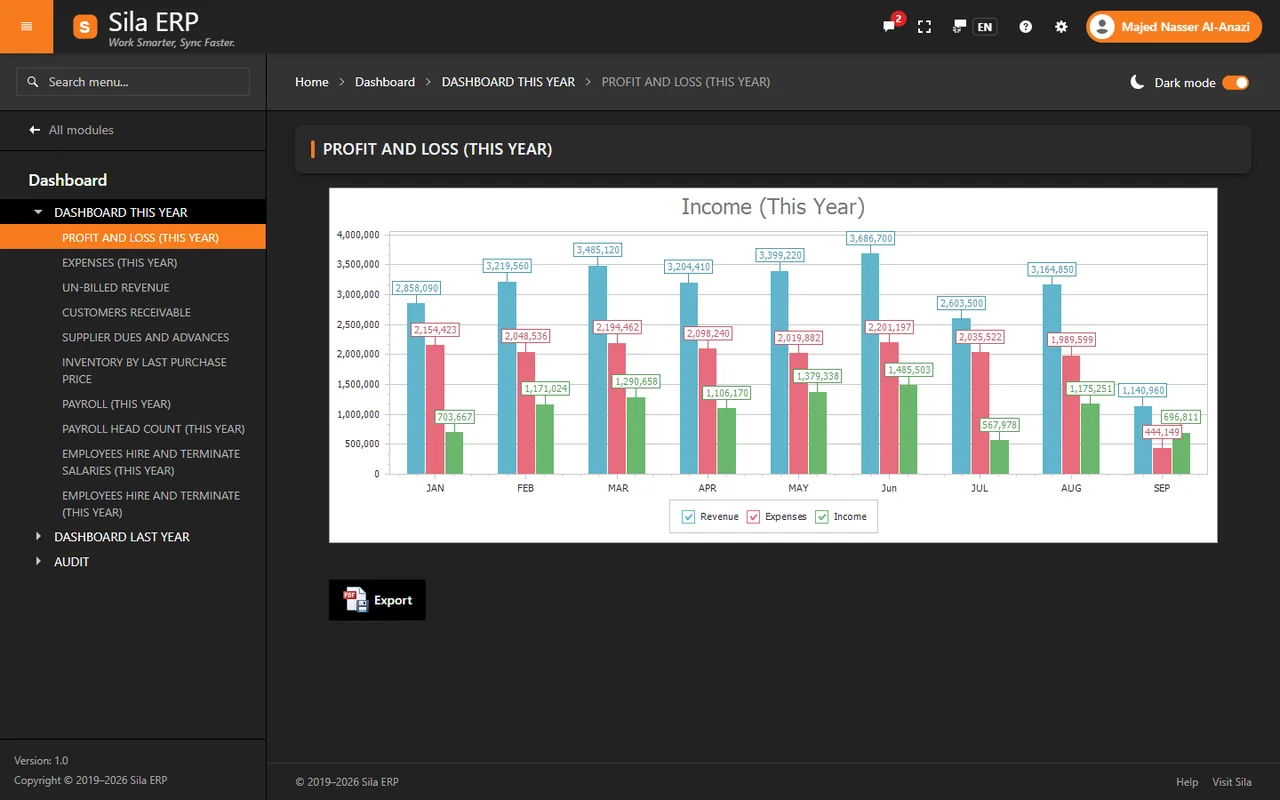
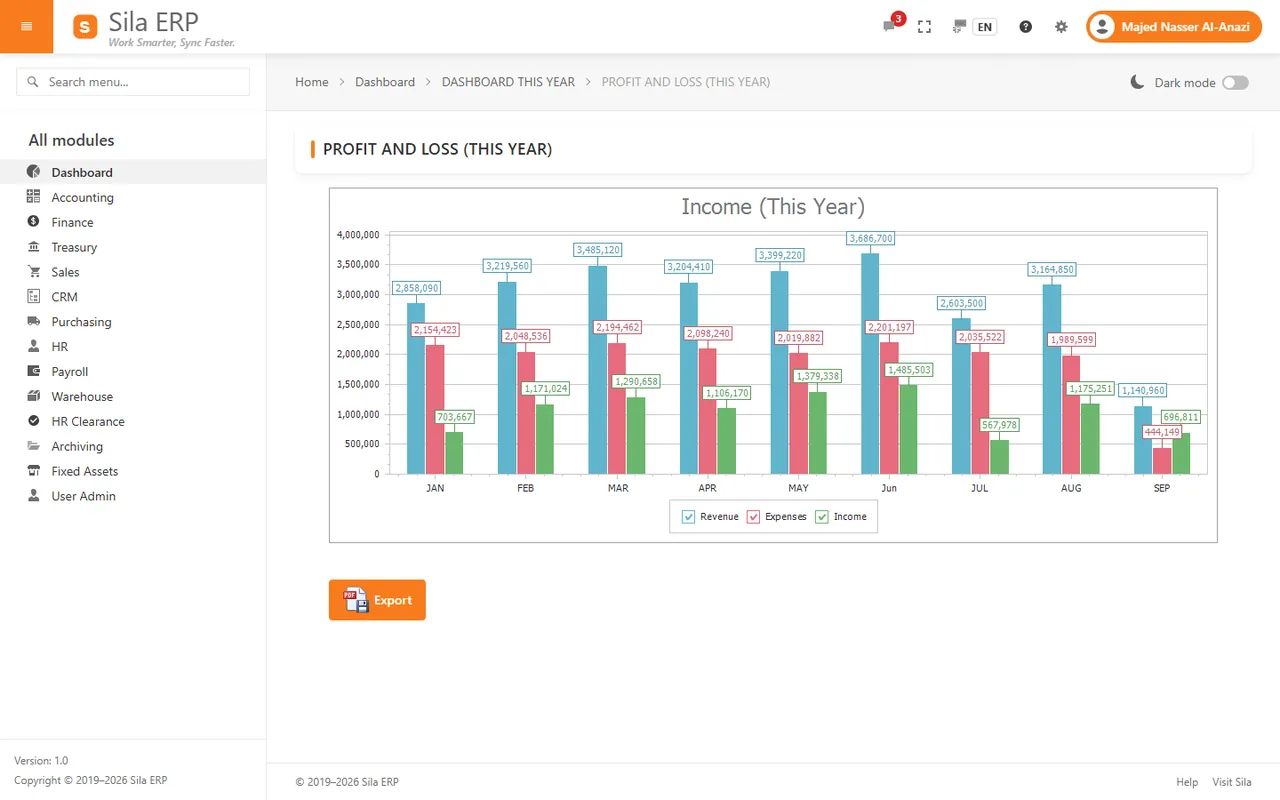
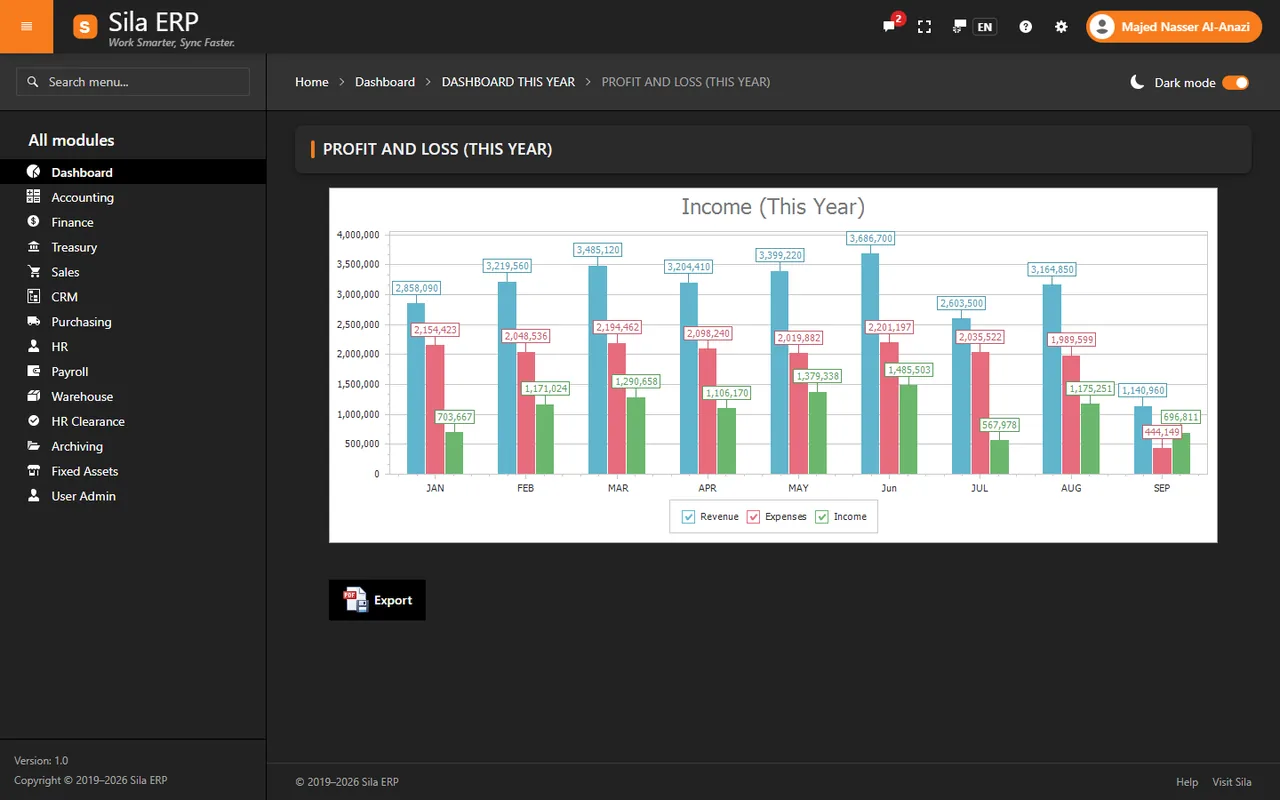
Sila ERP dashboard showing profit and loss by month in light mode, with the navigation panel listing all modulesSila ERP dashboard showing profit and loss by month in dark mode, with the navigation panel listing all modules
Real screen – demo company with fictitious data
Built in, not bolted on

Five things your team will use every day

Chat, user-session monitoring, a mobile app, project planning and document archiving are built into Sila ERP — not add-ons. There is no separate chat, file-sharing or project-planning tool to buy.

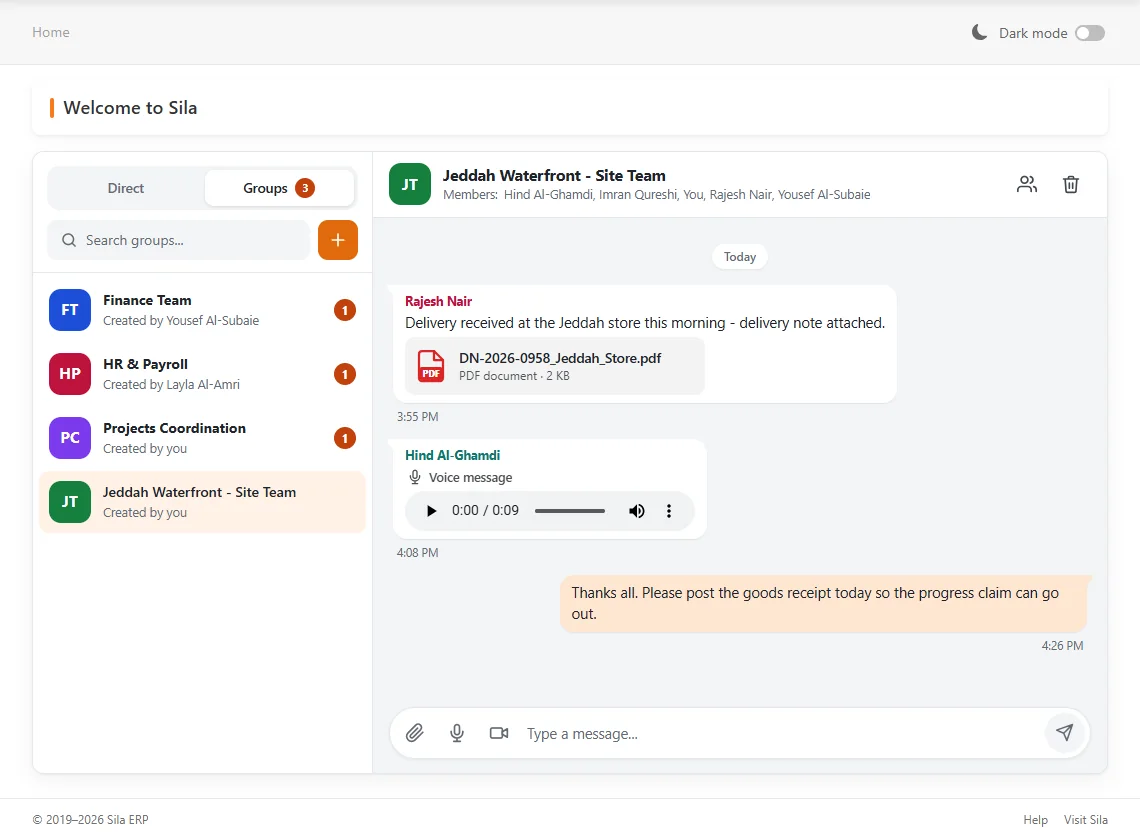
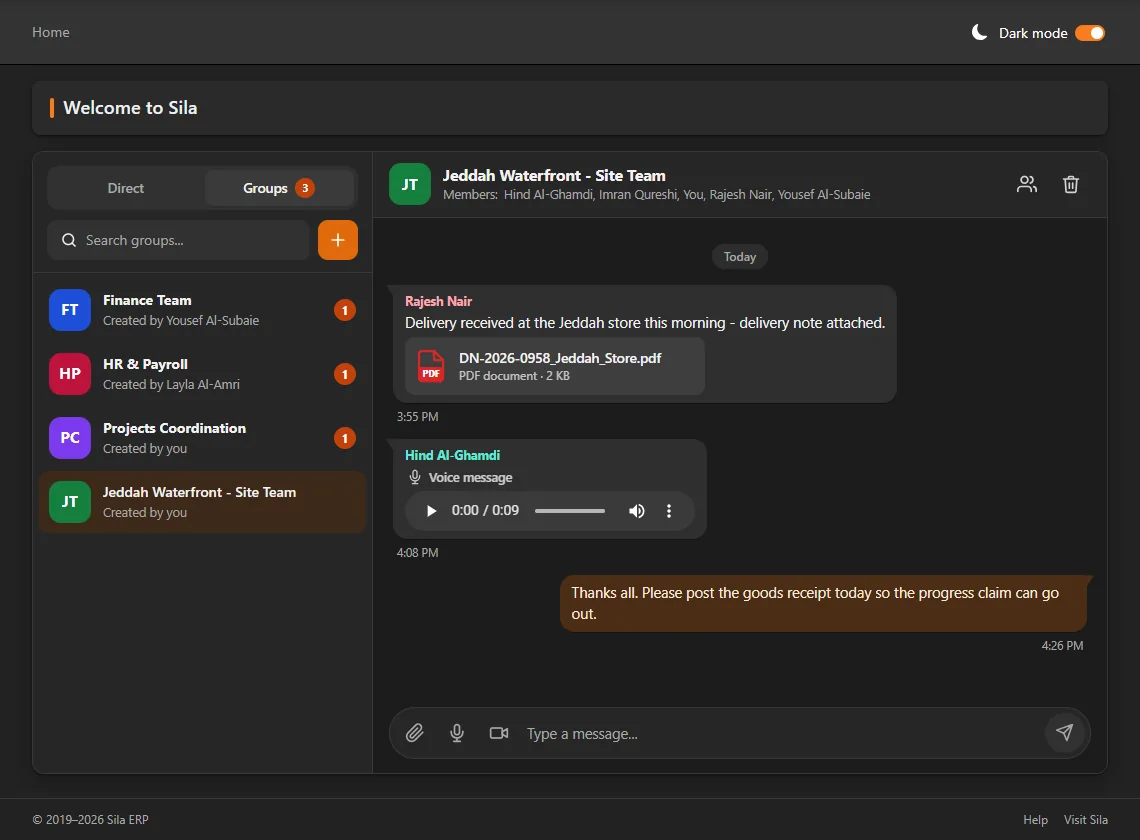
Group chat in Sila ERP: a delivery note PDF and a voice message in a project site team's conversationGroup chat in Sila ERP: a delivery note PDF and a voice message in a project site team's conversation
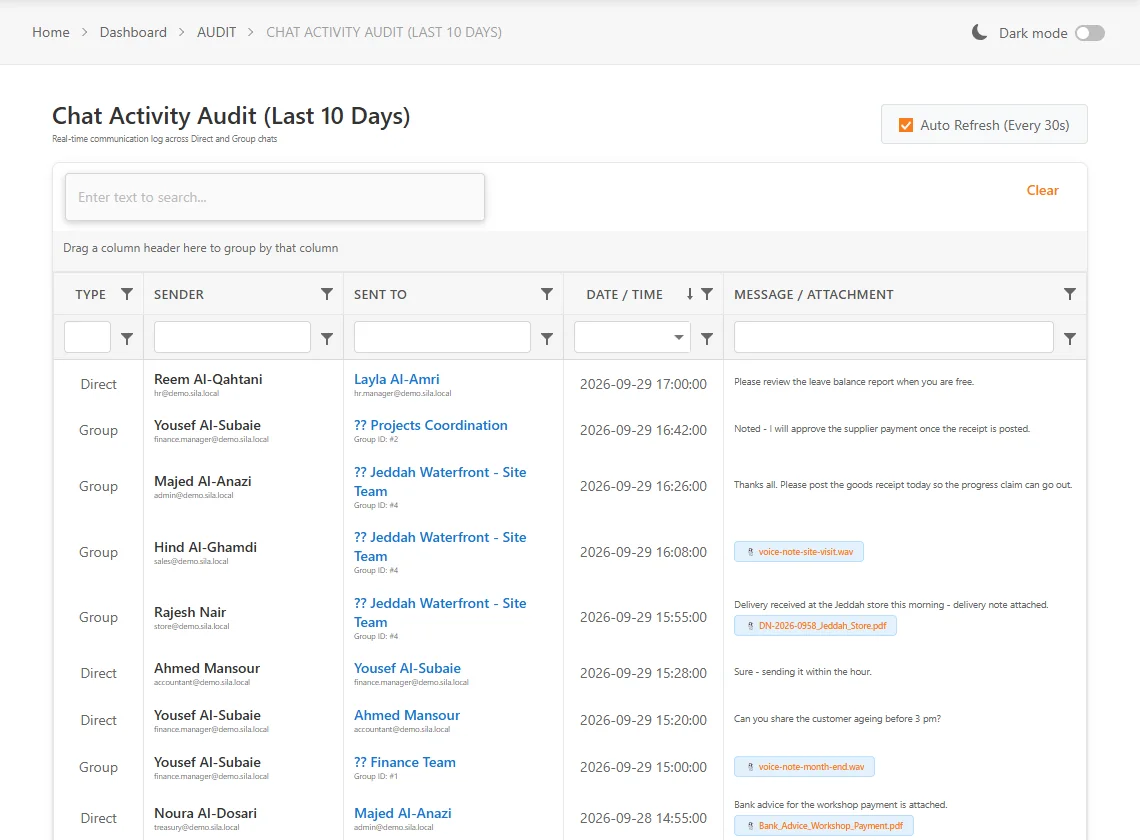
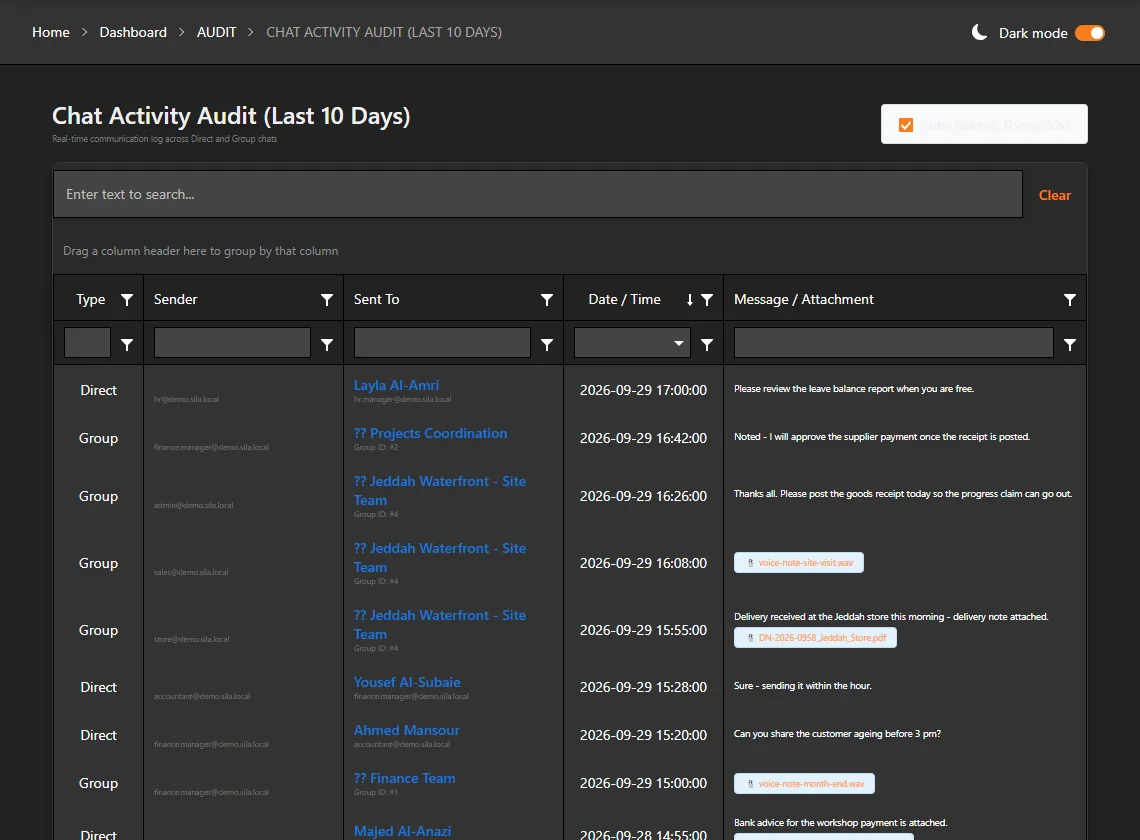
Chat Activity Audit: every direct and group message of the last 10 days with sender, recipient, time and attachmentChat Activity Audit: every direct and group message of the last 10 days with sender, recipient, time and attachment

Chat, built in

Direct (one-to-one) and group chat inside the ERP: text, files, photos, recorded voice (up to 10 min) and video (up to 3 min) messages, in real time. Every conversation, file, voice and video message stays on your own server, and management can review who sent what to whom in the Chat Activity Audit.

Details: Chat and collaboration
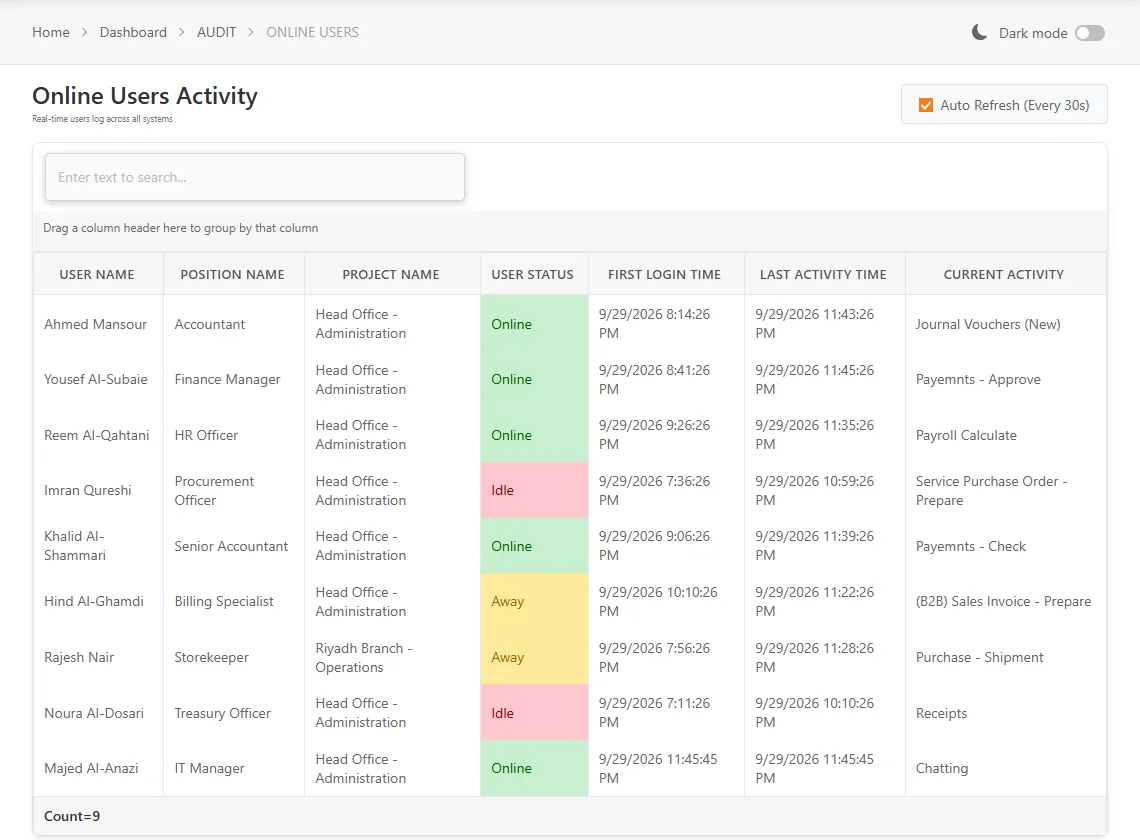
Online Users dashboard: signed-in users with status Online, Away or Idle, first login, last activity and the page each user is on

User sessions at a glance

The Online Users dashboard shows who is signed in and their status — Online (active in the last 15 minutes), Away (15–30 minutes) or Idle (over 30 minutes) — with first login, last activity, the page they are on, position and project. One session per user: a new sign-in ends the older one.

Details: Security and audit

Sila Mobile — Android now, iOS coming soon

Direct and group chat with photo and file sharing, and a live home dashboard refreshed each time you open the app: receivables and payables, profit and loss this year and last year, stock value — plus operational and financial reports. Same credentials, one session.

Details: Sila Mobile
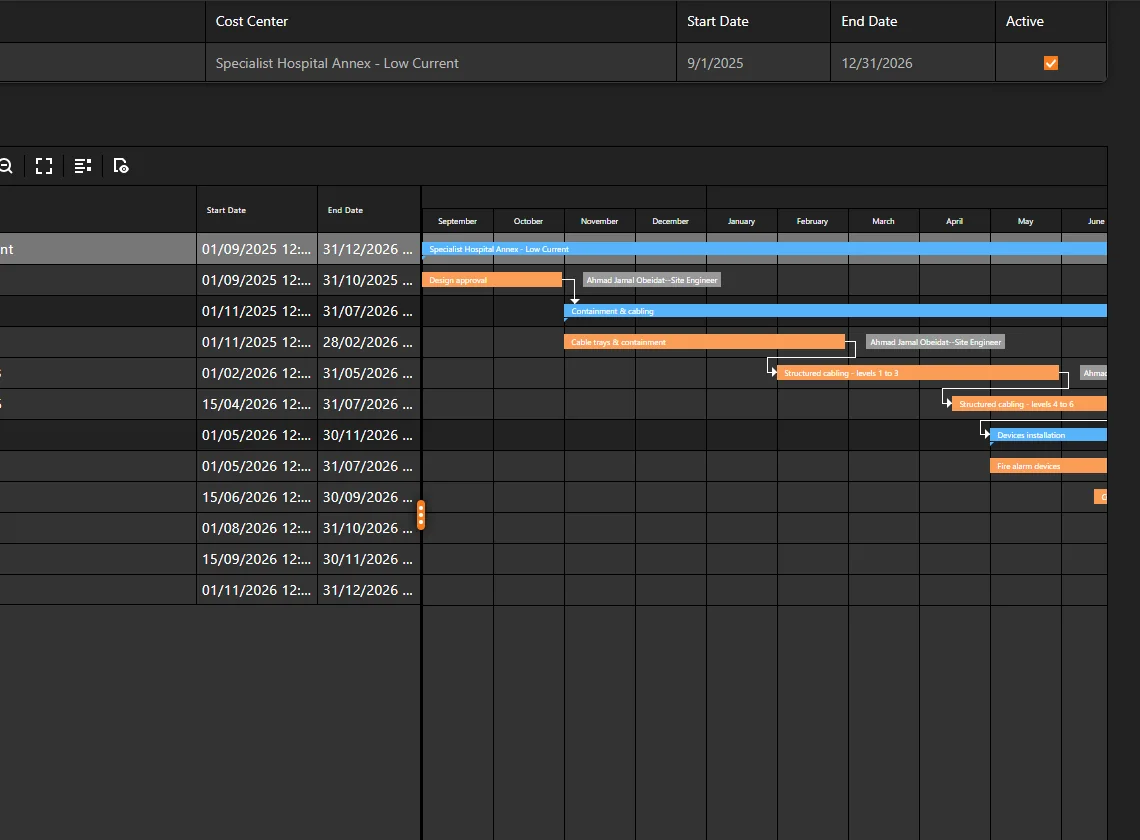
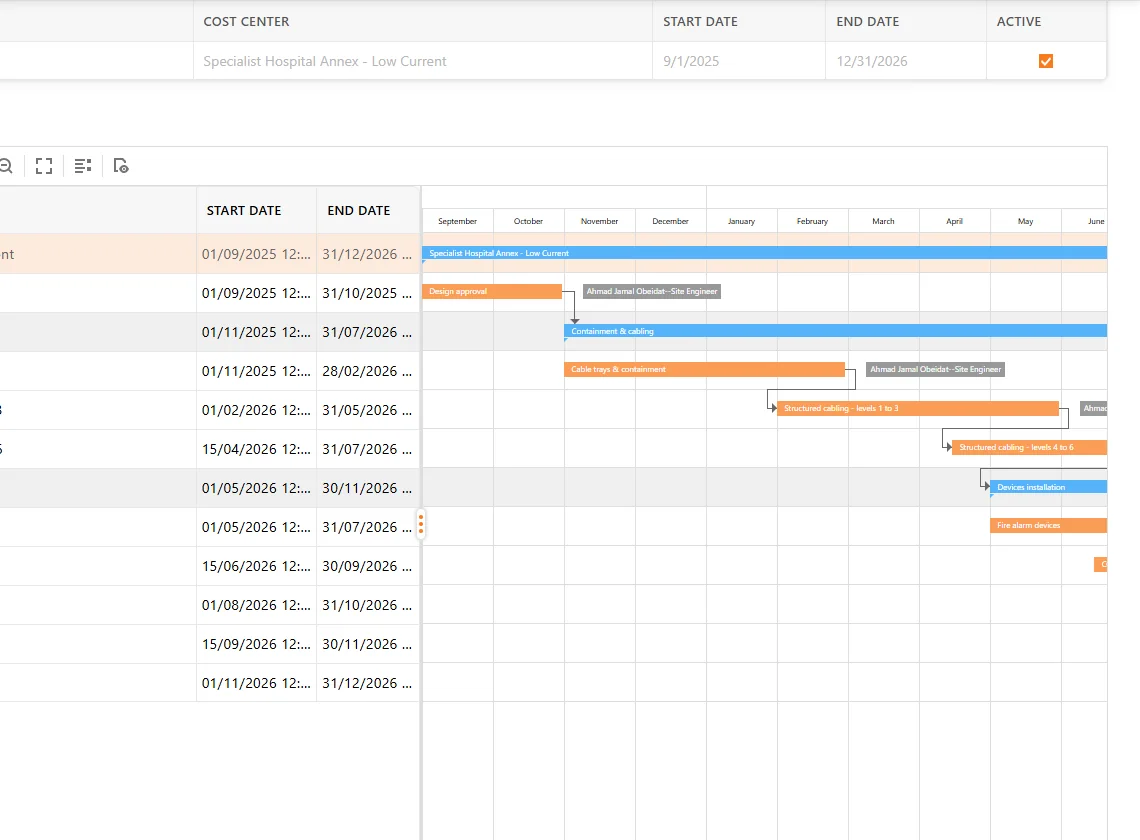
Project task management on a Gantt chart: tasks, sub-tasks, dependencies and assigned employeesProject task management on a Gantt chart: tasks, sub-tasks, dependencies and assigned employees

Project Gantt planning

Plan project tasks and sub-tasks with dependencies, progress and employee assignment on a Gantt chart, and export the plan to Excel.

Details: Projects and work orders
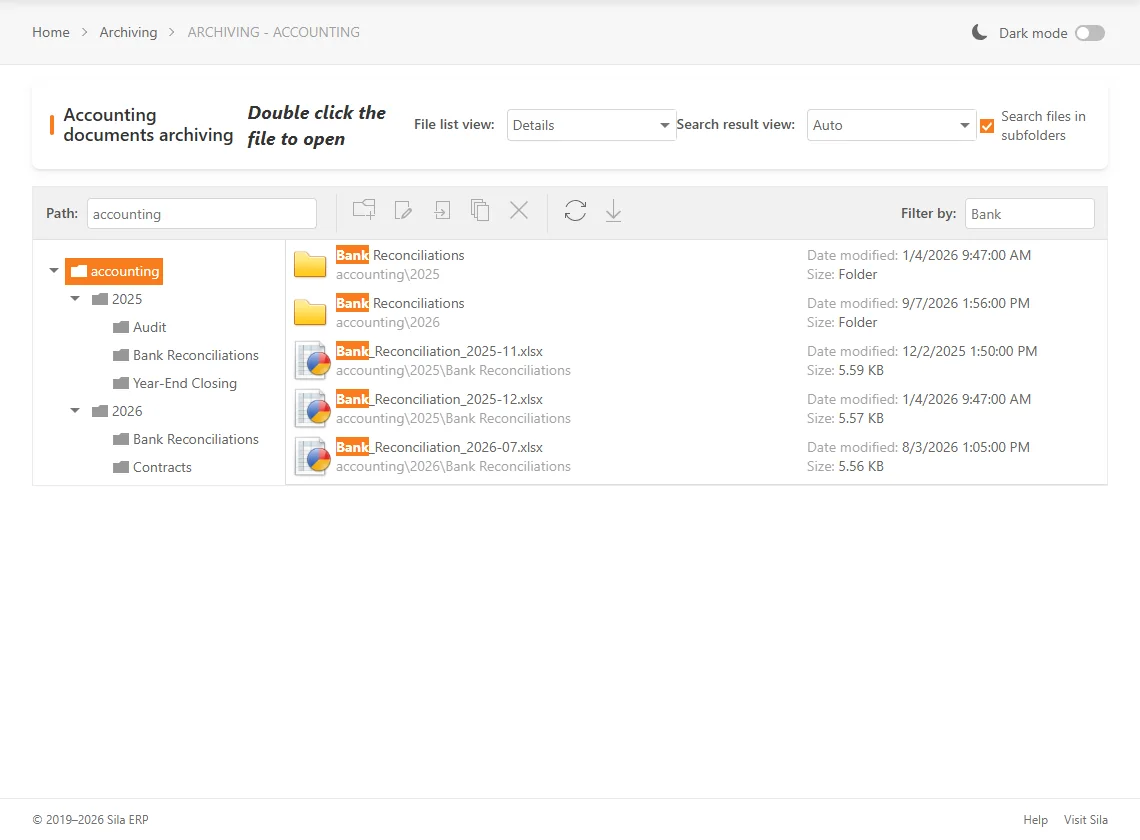
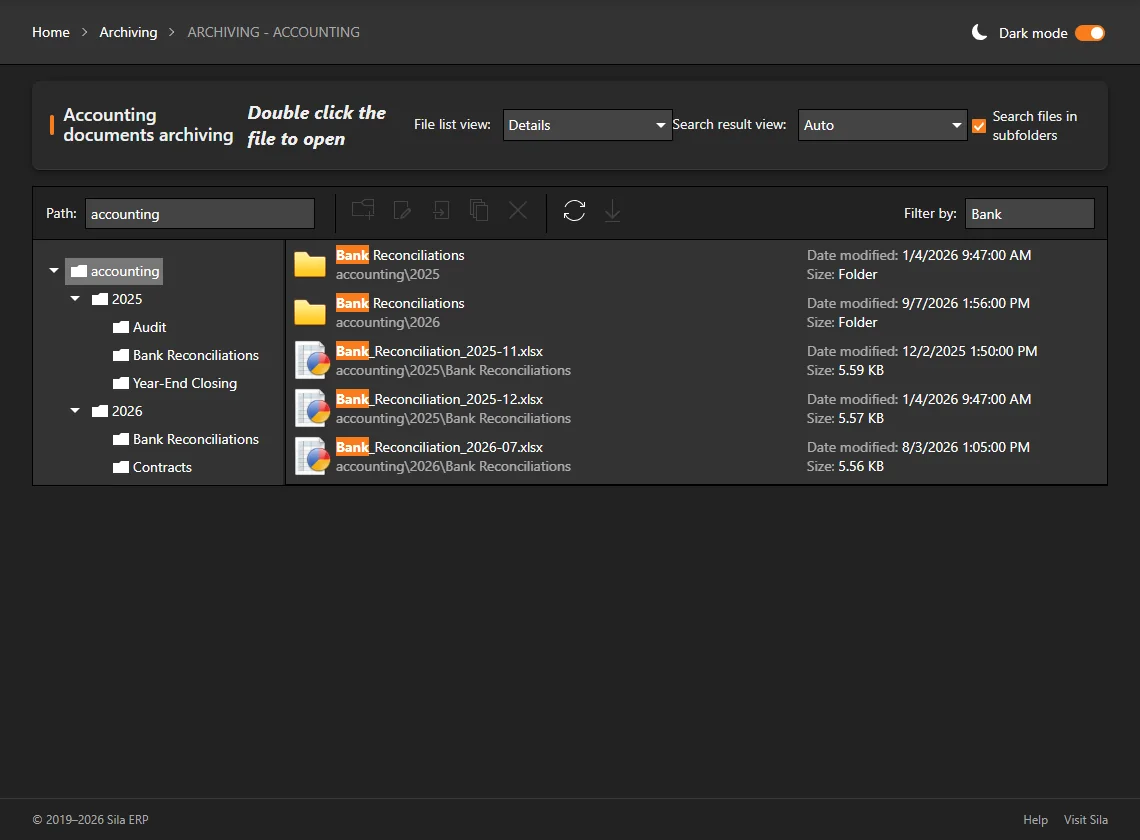
Accounting archive: folder tree by year and topic, with a name filter finding bank reconciliation files in every sub-folderAccounting archive: folder tree by year and topic, with a name filter finding bank reconciliation files in every sub-folder

Document archiving

Archive areas for Accounting, Employees, Fleet, HR, IT, Projects, Warehouse, Purchase Orders and Suppliers: folders, upload, move, copy, rename, download, in-browser preview of Excel and Word files, and a filter box to find files by name. Signed-in users with page permission only.

Details: Everyday tools

Screens: real Sila ERP screens of a demo company with fictitious data. The phone is an illustration.

Product introduction

One system, one general ledger

Sila ERP brings finance, sales, purchasing, warehouses, HR, payroll and fixed assets into one browser-based system built for Saudi companies.

Every transaction moves through prepare → check → approve → post, and posts directly to the general ledger. Stock movements, payroll accruals, end-of-service, vacations, fixed assets, sales and purchases all land in the same books – so the trial balance, statements and project profit and loss always reflect what has been approved.

It works in Arabic and English with full right-to-left layout, in light or dark mode, on desktop, tablet and phone.

Designed for

  • Service and project-based companies – work orders, project sites and sub-contractors
  • Companies with large or expatriate workforces – Iqama, sponsors, GOSI, end-of-service, vacation tickets
  • Companies issuing service tax invoices to businesses (B2B) and consumers (B2C) in Saudi Arabia
  • Organisations that need maker-checker control on payments, purchases, payroll and HR changes
  • Single companies running several warehouses and cost centers or branches
14navigation modules
~640screens
~100designed print reports
~177bilingual help topics
2languages, 2 themes
Why Sila ERP

Replace scattered spreadsheets with recorded, approved work

Sila ERP addresses the everyday problems of growing Saudi companies that have outgrown spreadsheets and disconnected tools.

Separate systems

Finance, HR, payroll, stock and sales kept in different files. Sila ERP puts them in one database with one general ledger.

Informal approvals

Payments and purchases approved by message or signature. Sila ERP records a multi-step approval chain with a pending-work list for each user.

Manual payroll

Salaries prepared by hand each month. Sila ERP guides payroll through 8 steps, from time-sheet template to publishing, with automatic GL journals.

Hand-calculated settlements

End-of-service and vacation settlements worked out in spreadsheets. Sila ERP calculates them on the Saudi Labour Law structure, with department clearances before payment.

E-invoicing requirements

Saudi e-invoicing (FATOORA) adds new steps to billing. Sila ERP is built for ZATCA Phase 2, using ZATCA's official SDK.

No project visibility

Profitability per project is unclear. Sila ERP reports profit and loss by project, by work order and by month, plus budget vs actual.

Key benefits

What you get with Sila ERP

Approval in every money-moving process

Prepare → check → approve → post, with a personal to-do list showing each user what waits for them.

Everything posts to one general ledger

Stock, payroll accruals, end-of-service, vacations, fixed assets, sales and purchases.

Depth for the Saudi workforce

End-of-service, GOSI, Iqama, vacation tickets, multi-department clearance, housing, cars and SIM cards.

Project and work-order profitability

A cost center on every GL line, material issued per work order, P&L per project and project budgets.

ZATCA Phase 2 integration

Built with ZATCA's own SDK: B2B clearance, B2C reporting and bilingual invoices with QR code.

Truly bilingual

Arabic right-to-left and English on the same screens, with each user's language saved.

Collaboration inside the ERP

Chat with voice and video messages, Kanban tasks, document archiving and a scheduler.

Web, phone and tablet

Responsive design, light and dark mode, installable to the home screen – plus the Sila Mobile Android companion app.

Modules overview

14 modules, organised in 9 solution areas

The navigation panel shows 14 modules. Each user sees only the modules and pages they have been granted.

  • 1Dashboard
  • 2Accounting
  • 3Finance
  • 4Treasury
  • 5Sales
  • 6CRM
  • 7Purchasing
  • 8HR
  • 9Payroll
  • 10Warehouse
  • 11HR Clearance
  • 12Archiving
  • 13Fixed Assets
  • 14User Admin

Modules: Accounting · Finance · Treasury

Finance & Accounting

A complete general ledger with controlled posting, treasury workflows, VAT capture and financial statements.

  • Journal, payment, receipt, petty-cash and recurring vouchers
  • 5-level chart of accounts with Arabic and English names
  • Trial balance, P&L, balance sheet, statements and ageing
  • Financial periods with year-end closing
Read more about Accounting & Finance
Feature overview

Everyday tools around the core modules

Beyond the business modules, Sila ERP includes the tools teams use every day to find work, collaborate and keep documents together.

To-do list

Every user sees what is waiting for their check or approval – vouchers, payments, receipts, employees, end-of-service, vacations, clearances, payroll, purchase orders and requests.

Menu search and favourites

Search the menu across all modules (Arabic-aware), keep a favourites menu and return to recently visited pages.

Contextual help

A bilingual Help Center with 12 sections and about 177 topics, opened from any page, plus page notes.

Chat

One-to-one and group chat with attachments, in-browser preview, recorded voice (up to 10 min) and video (up to 3 min) messages, presence and unread badges.

Tasks (Kanban board)

Drag-and-drop tasks with priority, due date and overdue flag, assignee, comments and attachments; shared tasks.

Archiving

Document archives by area – Accounting, Employees, Fleet, HR, IT, Projects, Warehouse, Purchase Orders and Suppliers – with upload, preview, move, copy and rename.

Office tools

A personal scheduler for appointments, and spreadsheet and word-processor editors in the browser.

Employee Self-Service

A separate portal where employees view pay slips, salary package, statement of account, vacations, loans and advances, bank account, contract and profile.

Export and print

Excel export on most grids, PDF or CSV on some, pivot export, and a built-in report viewer for printing.

Dashboards

This year and last year at a glance

Dashboards give management a quick view of results, balances and workforce, for this year and last year.

Finance

  • Profit and loss by month
  • Expenses by expense group
  • Un-billed revenue
  • Customers receivable
  • Supplier dues and advances
  • Inventory by last purchase price

People

  • Payroll
  • Payroll head count
  • Hires and terminations
  • Hire vs termination salaries
  • Employee dues and advances

Audit dashboards show users' activity, online users and chat activity (last 10 days). Dashboards are presented as bar charts.

Profit and loss (This Year) dashboard: revenue, expenses and profit by month for the demo companyProfit and loss (This Year) dashboard in dark mode: revenue, expenses and profit by month for the demo company
Real screen – demo company with fictitious data
Sila Mobile

Sila Mobile — Android companion app

Take key numbers and conversations with you. The Android app is available as a direct download from inside Sila ERP (QR code); iOS coming soon.

Android – availableiOS – coming soon
  • Live home dashboard, refreshed each time the app opens: customer receivables and supplier payables, profit and loss this year and last year, customer, supplier and sub-contractor counts, product and project counts, current stock value
  • Direct and group chat, with photo and file sharing
  • Operational and financial reports: finance, HR and stock
  • Audit: chat and user activity
  • Same sign-in credentials as Sila ERP
  • One active session per user, the same rule as the web application

Download it from the Tools menu inside Sila ERP (Get Mobile App) by scanning the QR code with an Android phone. The app is not distributed through app stores. The full system also works in the phone’s browser.

Reports

About 100 designed print reports

Report layouts for accounts, HR, warehouse, service sales, purchase orders, fixed assets, ZATCA invoices, budgets and sales orders open in a built-in report viewer with print and export. Most financial reports come in This Year, Last Year and All Years versions.

Financial statements

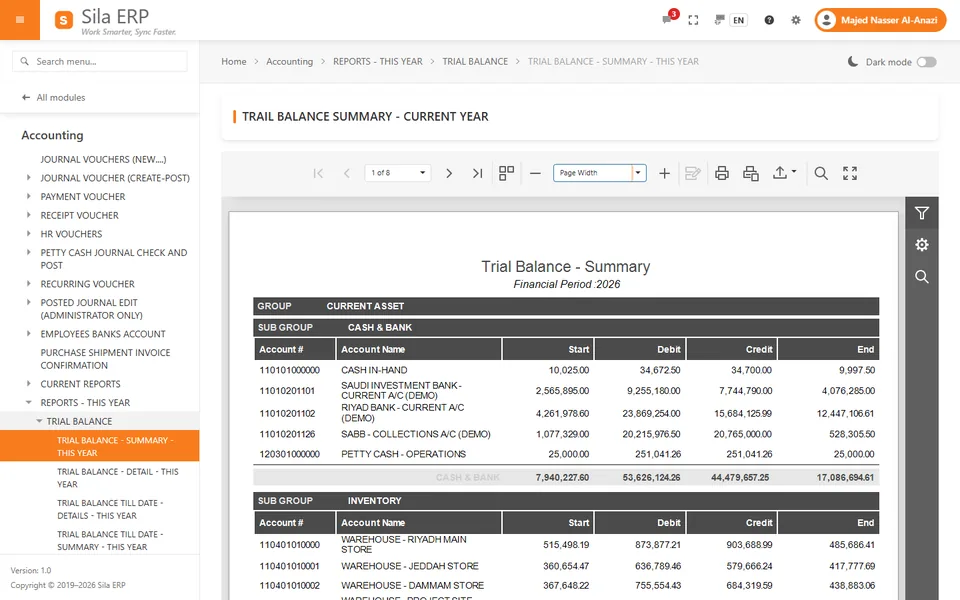
  • Trial Balance – summary, detail, till-date, month-wise
  • Profit and Loss – standard, by month, by project, work-order P&L
  • Balance Sheet – summary, detail, till-date

Statements and ageing

  • Account statements for all accounts, customers, suppliers, employees, sub-contractors, expenses and cost centers
  • Customer and supplier ageing: 0–30, 31–90, 91–180, 180+ days

Tax, HR and operations

  • VAT Report – output and input VAT ledger listing
  • Payroll, salary, end-of-service and vacation accrual reports
  • Available stock, item cardex and material release reports
Accounting & Finance

A general ledger with controlled posting

Journals, payments, receipts, petty cash and recurring vouchers, each with its own review steps before posting.

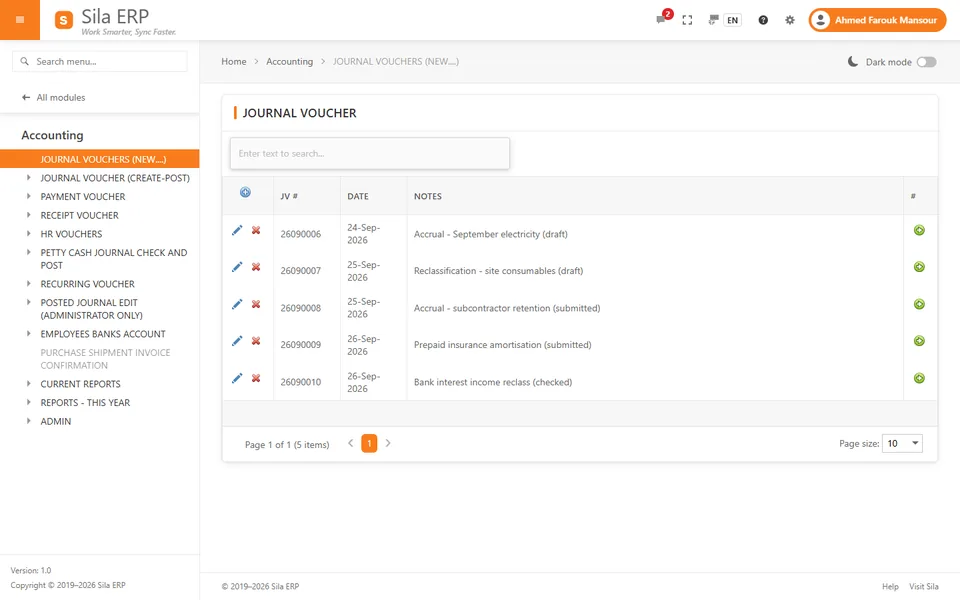
  • Journal vouchers: create → submit → post. The system refuses to submit or post a voucher that is empty or does not balance.
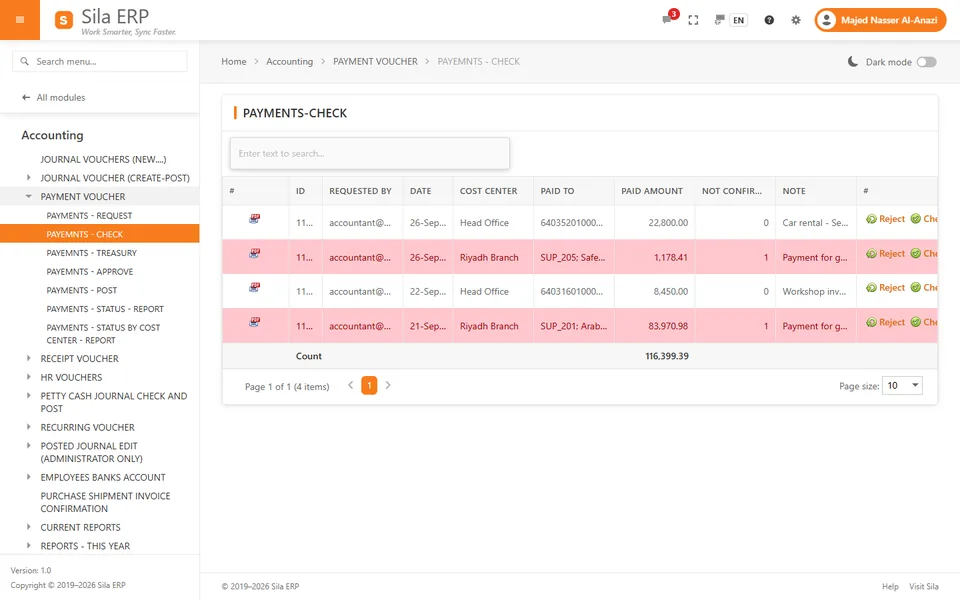
  • Payment vouchers: five steps – Request → Check → Treasury → Approve → Post. Posting writes debit, credit, VAT and bank-charges lines to the GL.
  • Receipts: record, then mark paid and post.
  • Petty cash: finance checks, posts or rejects petty-cash journals.
  • Recurring vouchers: a template with a schedule of dates; one click posts every voucher that is due.
  • Periods: accounting periods (months) open and close; financial years can be closed and reopened, and year-end closing posts the net result to a chosen account.
  • 5-level chart of accounts with Arabic and English names; a GL account created automatically for each customer, supplier and employee.
  • VAT input and output accounts with a default 15% rate.

Payment voucher approval chain

  1. Request
  2. Check
  3. Treasury
  4. Approve
  5. Post

Screens in the application

  • Journal Vouchers
  • Payment Voucher
  • Receipt Voucher
  • Petty Cash Journal Check and Post
  • Recurring Vouchers
  • Chart of Accounts
  • Cost Centers
  • VAT Setup
  • Accounting Periods
  • Financial Periods
  • Bank List
  • Ledger Account to Account Transfer

Example

An accountant requests a supplier payment with VAT; a reviewer checks it, the cashier confirms treasury, the finance manager approves and the accountant posts it. The GL, VAT account and supplier balance update at once, and the supplier statement and ageing reflect it immediately.

Sales, ZATCA invoicing & CRM

Service invoices from approval to ZATCA

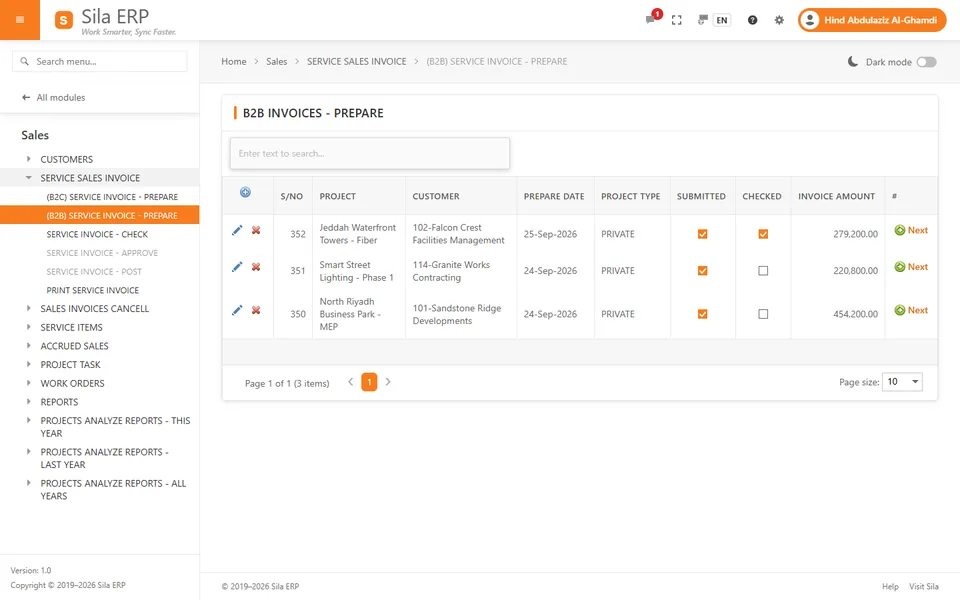
Issue B2B and B2C service tax invoices through an approval chain. On posting, the sales journal is created and the invoice is submitted to ZATCA.

  • Service invoice: Prepare → Check → Approve → Post. B2B invoices are sent for clearance; B2C invoices are sent for reporting.
  • Credit notes (full invoice cancellation): the same four steps, linked to the original invoice, submitted to ZATCA, and the original marked cancelled.
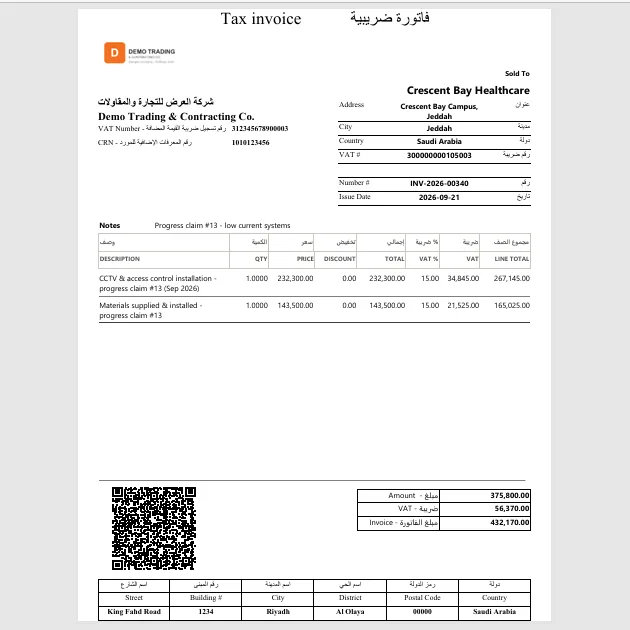
  • Bilingual (Arabic/English) tax invoice and credit-note print with QR code; tax-invoice PDF (PDF/A-3) with the invoice XML embedded.
  • Customers: each with its own GL account; Local, International and Sub-contractor types; Saudi national-address fields; VAT number validation (15 digits).
  • Accrued sales: prepare and approve unbilled revenue with an automatic reversal on the 1st of the next month, plus ageing reports.

CRM – sales pipeline

Leads: New → Contacted → Qualified → Converted or Lost.

Opportunities: Qualification → Proposal → Negotiation → Won or Lost, with value and expected close date.

Record calls, emails, meetings, tasks and notes, then convert a lead to a customer – the customer and its GL account are created for you.

Screens in the application

  • Customer
  • Customer Groups
  • (B2B) Service Invoice – Prepare
  • (B2C) Service Invoice – Prepare
  • Service Invoice – Check / Approve / Post
  • Print Service Invoice
  • Sales invoices cancel (credit note)
  • Accrued Sales
  • Leads
  • Opportunities
Purchasing

From purchase request to supplier payment

Every purchase follows a recorded path, and each stage hands over to the next team.

  1. Purchase request
  2. Purchase order
  3. Goods receipt
  4. Supplier invoice
  5. Payment
  • Purchase requests: create → check → approve. Purchase orders: prepare → check → approve.
  • Service purchase orders: prepare → check → approve → post to the GL.
  • VAT on each purchase-order line; secondary units with conversion.
  • Cancellation is blocked once goods are received; partial cancellation never goes below the received quantity.
  • Status audit per purchase order; fully and partially pending purchase order reports.

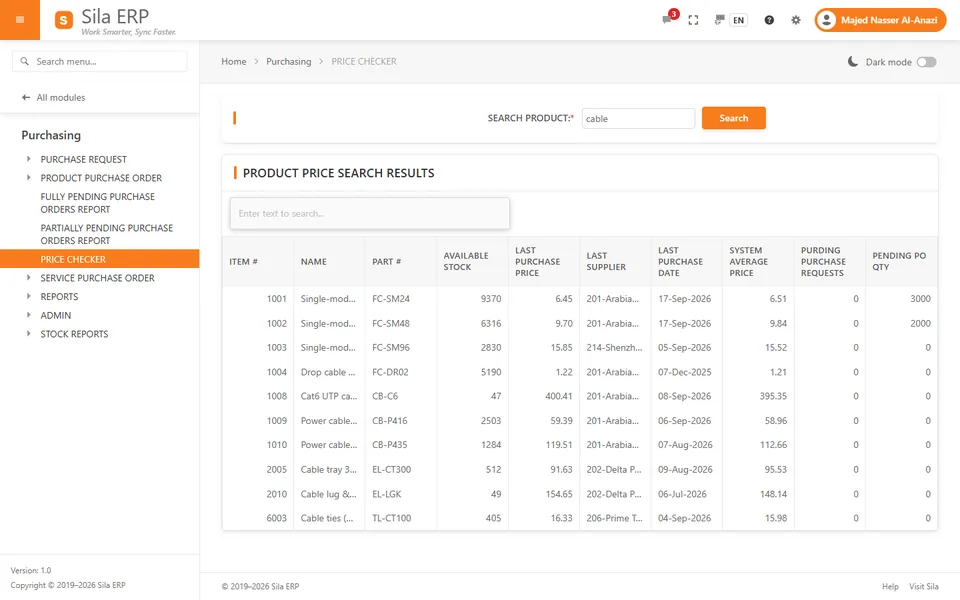
Price Checker

Before ordering, see stock on hand, last purchase price, last supplier, average price, pending requests and pending purchase-order quantities in one place.

Screens in the application

  • Purchase Request – Create / Check / Approve
  • Purchase Order – Prepare / Check / Approval
  • Cancel Purchase Order
  • Service Purchase Order
  • Price Checker
  • Suppliers Statement
  • Suppliers Ageing
  • Purchase Analyze
  • Products

Example

A site engineer raises a purchase request; procurement checks the Price Checker and raises a PO; the manager approves; the warehouse receives the shipment (stock, VAT input and supplier balance post automatically); accounts confirms the supplier invoice; treasury runs the payment chain.

Inventory & Warehouses

Stock that always matches the ledger

Every stock movement posts to the general ledger, and each warehouse has its own GL account and cost center.

  • Goods receipt ("Purchase – Shipment") and material release ("Products Request – Delivery").
  • Stock transfers in two steps – send and receive – with GL entries.
  • Stock opening balance and physical count with posting.
  • Moving-average costing; material issued against a work order.
  • Per-user warehouse authorization.
  • Also tracks company cars, mobile SIM cards, accommodation, and employee deductions for cars, tools, modems and material.

Stock reports

  • Available Stock (list and grid)
  • Available Stock by Average Price and by Last Purchase Price
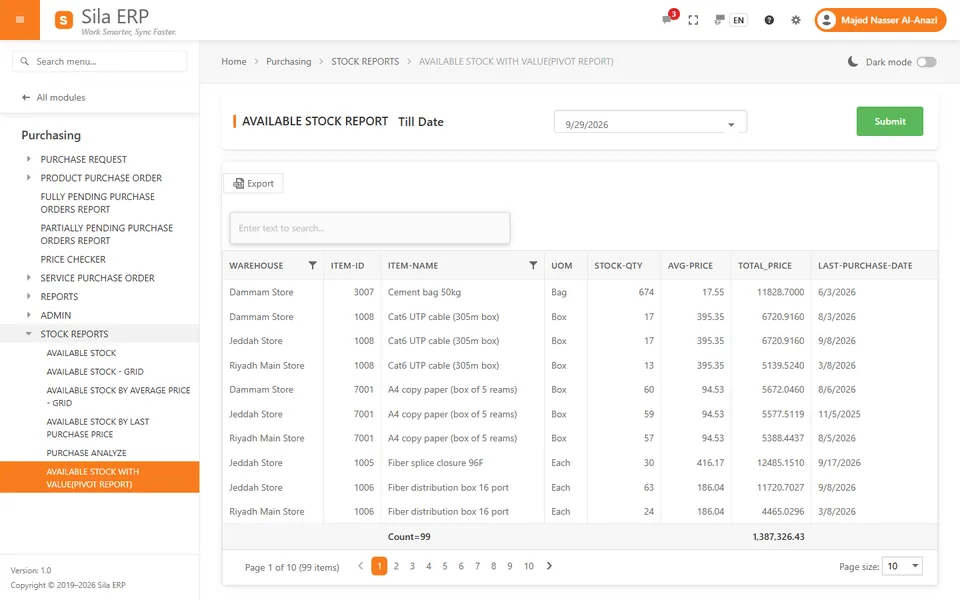
  • Available Stock with Value (pivot, by date)
  • Item Cardex
  • Warehouse All Transactions
  • Material Release by date and by Work Order
  • Cars Report and SIM Cards Report
HR & Payroll

People, settlements and payroll with approvals built in

From hiring approval to final settlement, every change to an employee file is checked and approved – and the rules protect the payroll.

Employee file

  • Create, check and approve employees
  • Contract, renewal, benefits, package, salary, position, relocation and status updates
  • Iqama, passport, sponsor and medical-insurance details
  • Positions with maximum package; departments, divisions and areas

Settlements and clearance

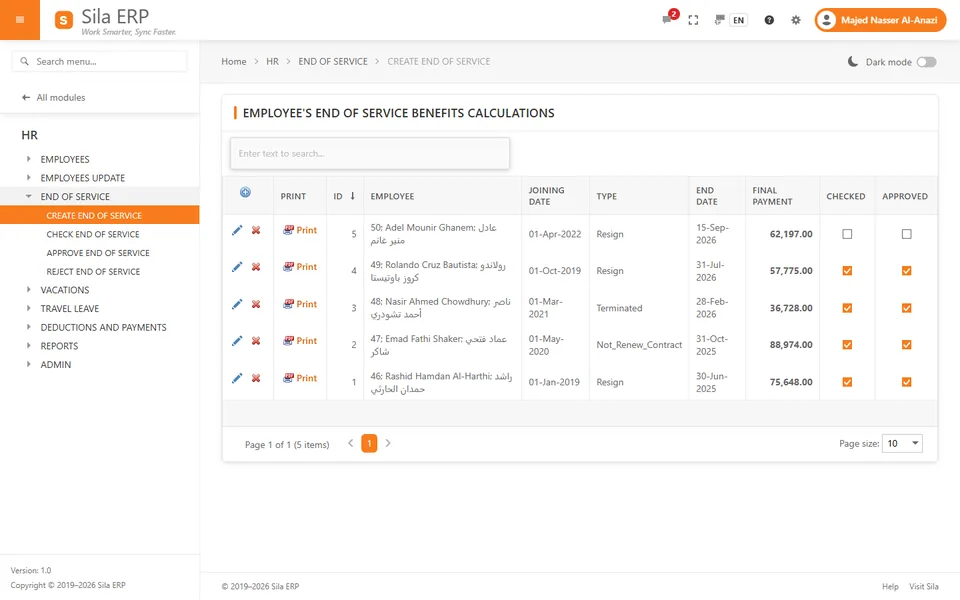
  • End-of-service calculated on the Saudi Labour Law structure
  • Annual vacation payments and travel leave, with exit/re-entry amounts
  • Clearance by 10 departments: car, tools, IT/assets, modems, SIM & mobile, medical insurance, government/legal, accounts & petty cash, store/warehouse, accommodation

Rules the system enforces

  • An offer above the position's maximum package cannot be checked or approved
  • End-of-service and vacation payments cannot be posted while any clearance is pending
  • Payroll cannot be calculated while deductions are unapproved

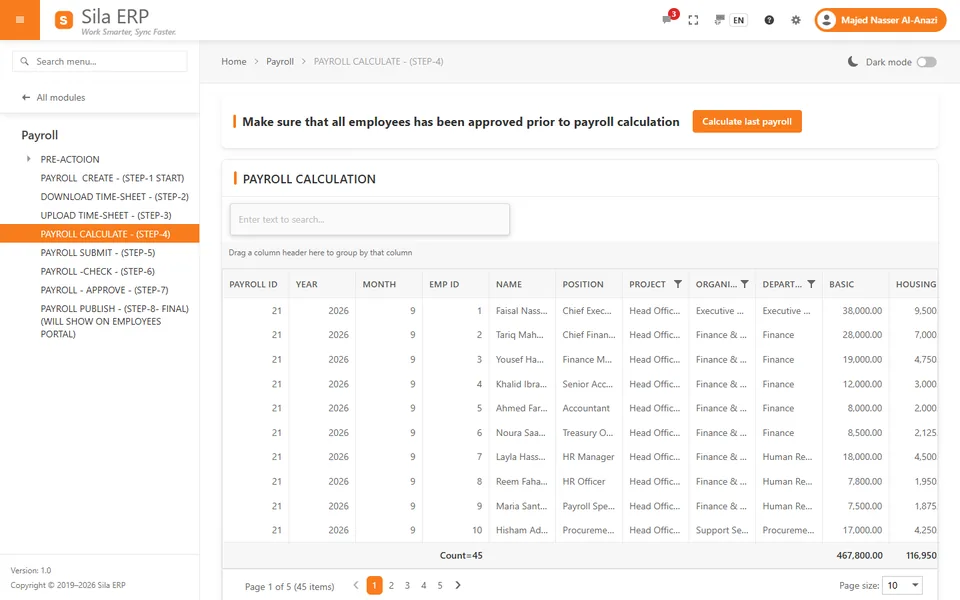
8-step payroll

  1. Create payroll
  2. Download time-sheet template
  3. Upload time-sheet
  4. Calculate
  5. Submit
  6. Check
  7. Approve
  8. Publish

Separate GL postings for salary, deductions, payments, end-of-service accrual, vacation accrual, vacation-ticket accrual, GOSI deduction, GOSI Saudi and non-Saudi accruals, and Iqama-renewal accrual. A payroll payment request produces an Excel-exportable bank list. Published payroll appears in each employee's self-service portal.

Fixed Assets

An assets register fed by approved purchases

Assets enter the register through an approved purchase and leave it through an approved disposal – with the GL updated each time.

  • Assets purchase order: create → check → approve.
  • Assets purchase shipment creates one register record per unit and posts to the GL.
  • Asset groups with useful life, GL accounts and VAT %.
  • Straight-line depreciation, posted monthly by the user, by expense account, accumulated-depreciation account and project cost center.
  • Assets sales order – sell, scrap, lost or removed – posts the disposal journal with gain/loss and VAT.
  • Custody and status updates; register list with book value at a date.

Screens in the application

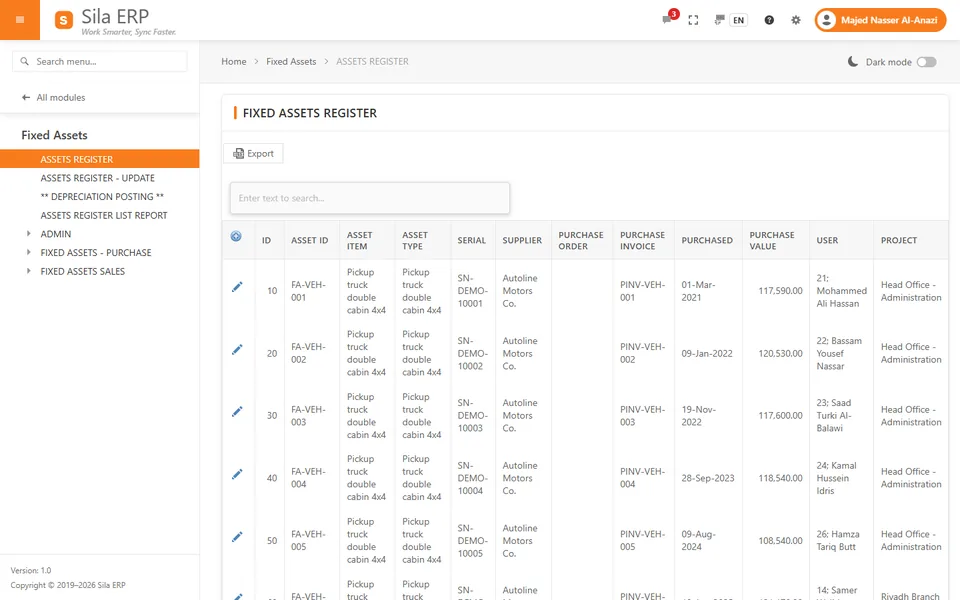
  • Assets Register
  • Assets Register – Update
  • Depreciation Posting
  • Assets Register List Report
  • Asset Groups
  • Asset Items
  • Assets Purchase Order
  • Assets Purchase Shipment
  • Assets Sales Order
Budgeting

Plan, approve and compare with actuals

Company budget

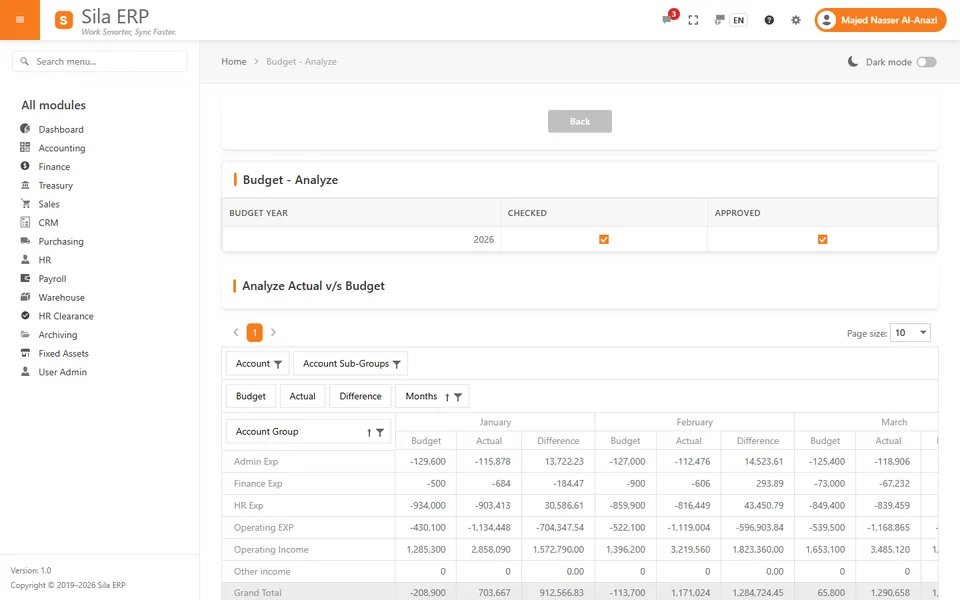
Create → check → approve → re-open → analyse and print. Budget vs actual per account and per month, with revenue, admin, financial, HR and operating tabs and a pivot with Excel export.

Project budget

One budget per project or cost center per year, with approval and budget vs actual per project and for all projects – this year and last year.

HR plan budget

Planned vacancies and the maximum budgeted salary per position, used to control employee offers.

Projects & Work Orders

Know what each project and work order earns

Projects are linked to a cost center and to revenue, cost and accrued-revenue accounts, so their results come straight from the ledger.

  • Work orders (project sites): job work order, customer PO, job type, scope, region, customer, value, sub-contractor, project manager and supervisor.
  • Work order revenue, expenses and P&L; material released per work order; sub-contractor statements.
  • Per-user project authorization.
  • Project task management (Gantt): tasks, sub-tasks, dependencies, progress, resource assignment and Excel export.

Project reports

  • Profit and Loss by Projects
  • Profit and Loss by months by projects
  • Projects Analyze (pivot)
  • Payroll by Projects
  • Cost to Company by Projects
  • P&L Ledger Grid by Projects

Available for this year, last year and all years.

Branches, cost centers & warehouses

One company, many branches and warehouses

Sila ERP runs one company per database. Branches and departments are handled as cost centers, and stock can be held in several warehouses.

Cost centers on every line

Every GL line carries a branch or cost center and an optional work order. Cost centers have a parent, so you can organise main and sub cost centers.

Reporting by cost center

Account statements and payment status reports by cost center, and profit and loss by project.

Multiple warehouses

Each warehouse has its own GL account and cost center, with two-step transfers between warehouses and per-user warehouse authorization.

Please note: Sila ERP is a single-company system. It does not provide multi-company consolidation, and it does not handle multiple currencies or exchange rates.

Arabic / English

Every screen in Arabic and English

Each user chooses a language with one click, and the choice is saved for next time.

  • Full right-to-left layout in Arabic; the navigation moves to the right.
  • Chart of accounts with Arabic and English account names.
  • Bilingual tax invoice and credit-note print.
  • Bilingual Help Center.
  • Gregorian calendar in both languages.

Some built-in components – the report viewer, pivot tables, charts, spreadsheet, scheduler and Gantt – still show their own labels in English on Arabic pages.

English
  • Journal Vouchers
  • Payment Voucher
  • Trial Balance
  • Service Invoice
  • End of Service
  • HR Clearance
العربية
  • قيود اليومية
  • سند صرف
  • ميزان المراجعة
  • فاتورة خدمات
  • نهاية الخدمة
  • إخلاء الطرف
Saudi Arabia & ZATCA

Built for ZATCA Phase 2 and Saudi requirements

Built for ZATCA Phase 2 (FATOORA integration phase): B2B clearance and B2C reporting through ZATCA's official SDK.

E-invoicing (FATOORA)

  • ZATCA onboarding from the Company screen: OTP, CSR and private key via the ZATCA SDK, compliance CSID, six compliance checks, production CSID
  • UBL 2.1 XML, invoice counter (ICV) and previous-invoice hash (PIH)
  • Signing, hashing and Phase 2 QR code through the ZATCA SDK
  • B2B standard invoices sent for clearance and B2C simplified invoices sent for reporting, at posting
  • Credit notes linked to the original invoice, cleared or reported the same way
  • PDF/A-3 invoice with embedded XML; bilingual print with QR; ZATCA status stored per invoice

Saudi business requirements

  • VAT: input and output accounts, default 15% rate, VAT on purchase lines, payments, goods receipts and invoices; VAT ledger report
  • Validates Saudi VAT numbers (15 digits)
  • Saudi national-address fields for customers
  • GOSI: deductions and accruals (Saudi and non-Saudi) calculated in payroll and posted to the GL
  • End-of-service benefits calculated on the Saudi Labour Law structure
  • Iqama, passport, sponsor and medical-insurance details; Iqama-renewal accrual in payroll
  • Vacation ticket accrual; exit/re-entry amounts on vacation payments

Good to know: We support your onboarding and go-live on ZATCA's production environment. The onboarding steps listed above are run from the Company screen.

Security & access control

Control who sees and does what

A factual summary of the security and access controls in Sila ERP.

Protected sign-in

Salted, hashed passwords for ERP users; one-time password-reset links that expire after 60 minutes; a password change ends other sessions.

One active session per user

A new sign-in ends the older session and shows a notice.

Page-level permissions per user

Every page is checked against the user's grants. Administrators grant or revoke by module or function, copy one user's permissions to another and transfer permissions, with an access-analysis pivot.

Warehouse and project authorization

Each user can be limited to specific warehouses and projects.

Maker-checker approvals

Each step is a separate screen with its own permission, so you can assign preparing, checking and approving to different people.

Activity audit

Users activity, online users and chat activity pages; a page-visit log; failed sign-ins are logged.

Friendly error pages

Bilingual error pages with a reference number; technical errors are logged on the server and never shown to users.

Controlled file uploads

Uploaded files are restricted by type, stored outside executable paths and available to signed-in users only.

Analytics

Drag-and-drop analysis of your own data

The Analyze pages are pivot tables: drag fields to rows and columns, filter, drill in and export the result.

Analyse the general ledger, revenue, expenses, profit and loss, projects, payroll, purchases, material release and stock value – for this year, last year or all years where available.

Analyze pages

  • General Ledger Analyze
  • Revenue Analyze
  • Expense Analyze
  • P&L Analyze
  • Projects Analyze
  • Payroll Analyze
  • Purchase Analyze
  • Material Release Analyze
  • Available Stock with Value
Workflow

Prepare, check, approve, post

The same control runs through payments, purchases, invoices, payroll and HR changes. Nothing reaches the ledger until it has been reviewed.

Approval workflow Four steps from left to right: Prepare, Check, Approve and Post. Posting writes the transaction to the general ledger. 1 PrepareRecord the transaction 2 CheckReview the entry 3 ApproveAuthorised by the approver 4 PostWritten to the ledger General LedgerStatements · Trial balance · P&L Each step appears in the next user's to-do list. Who may check or approve is set by page-level permissions. Approval workflow: Prepare, Check, Approve, Post, then General Ledger 1 PrepareRecord the transaction 2 CheckReview the entry 3 ApproveAuthorised by the approver 4 PostWritten to the ledger General LedgerStatements · Trial balance · P&L

Payment voucher

Request → Check → Treasury → Approve → Post

Service invoice

Prepare → Check → Approve → Post and submit to ZATCA

Purchase order

Prepare → Check → Approve, then goods receipt

Payroll

Calculate → Submit → Check → Approve → Publish

Screenshots

A look inside Sila ERP

Real screens from Sila ERP, captured from a demo company with fictitious data.

Journal vouchers list with drafts, submitted and checked vouchers waiting to be posted
Journal VouchersReal screen – demo company with fictitious data
Payments – Check list: payment requests waiting for the reviewer, with reject and check buttons
Payment Voucher – CheckReal screen – demo company with fictitious data
Trial balance report in the built-in report viewer
Trial Balance – Summary – This YearReal screen – demo company with fictitious data
Sila ERP dashboard showing profit and loss by month in light mode
Profit and loss by month – This Year (dashboard)Real screen – demo company with fictitious data
B2B service invoices being prepared, submitted and checked before approval and posting
(B2B) Service Invoice – PrepareReal screen – demo company with fictitious data
Bilingual Arabic and English tax invoice with QR code
Print Service Invoice (bilingual, with QR code)Real screen – demo company with fictitious data
Price Checker showing stock on hand, last purchase price and last supplier
Price CheckerReal screen – demo company with fictitious data
Available stock with value by warehouse on a selected date
Available Stock with ValueReal screen – demo company with fictitious data
Payroll calculation grid with basic salary, allowances and totals per employee
Payroll – CalculateReal screen – demo company with fictitious data
End-of-service settlement calculation screen
Create End of ServiceReal screen – demo company with fictitious data
Fixed assets register with asset items, suppliers, purchase values and users
Assets RegisterReal screen – demo company with fictitious data
Budget vs actual pivot by account and month
Budget vs ActualReal screen – demo company with fictitious data
Product demonstration

See Sila ERP with your own processes in mind

Demos run on a demo company with fictitious data, in Arabic or English. Choose a short overview or a deeper walk-through.

30 minutes

Overview

  1. The workspace: navigation, menu search, to-do list, Arabic/English and light/dark mode
  2. A journal voucher and a payment voucher through check, approval and posting
  3. A B2B service invoice from preparation to posting, with the bilingual QR invoice
  4. Dashboards, trial balance and a customer statement
  5. Questions and next steps
60 minutes

Deep dive

  1. Everything in the overview
  2. Purchasing: purchase request, Price Checker, purchase order and goods receipt
  3. HR: employee approval, end-of-service calculation and department clearance
  4. Payroll: the 8 steps from time-sheet upload to publishing and GL posting
  5. Projects: work orders, project P&L and budget vs actual
  6. Permissions: page-level grants, warehouse and project authorization
FAQ

Frequently asked questions

Contact

Talk to us

Questions about modules, implementation or ZATCA go-live? Visit www.wiseotech.net or request a demo below.

Request a demo

Request a demo

Tell us about your company and the modules you are interested in. Fields marked with an asterisk are required.

Prefer to read first?

Download the Sila ERP brochure: modules, workflows, reports, ZATCA e-invoicing, security and deployment options, in 20 pages.

Modules of interest
Preferred demo language

We use your details only to arrange the demo. You can also contact us at sales@wiseotech.net or www.wiseotech.net. See our Privacy policy.

Work Smarter, Sync Faster.

See how Sila ERP brings your finance, sales, purchasing, warehouses and people into one bilingual system – with every posting checked and approved.